
Bayshore Safety & Industrial Supplies Guide
Can you get a safety vest custom printed with a logo? What ANSI/ISEA 107 allows on the background, where a logo goes, screen print vs heat transfer vs embroidery, minimums and lead time, and how to order one
Yes. A company logo goes on the fluorescent background of a rated vest and the vest keeps its class, as long as the print stays inside the area the manufacturer sets aside for it and does not cover the retroreflective tape; ANSI/ISEA 107 requires a minimum area of background and of tape for each class (Class 2: 775 square inches of background and 201 of tape), and a logo that sits on the background within the allowed area does not reduce either below the minimum. On this site the imprint is done by the manufacturer: the Add Your Logo page takes the artwork, the quantity and the sizes, we email a price and a free proof within one business day, nothing prints until the proof is approved, and the printed garments ship about two to three weeks after that. The minimum is 24 for vests, shirts and jackets; hard hats run 10 to 40 by brand, safety glasses 300 and cooling towels 100. Every product page with the “Add my company logo” option is a garment approved for printing.
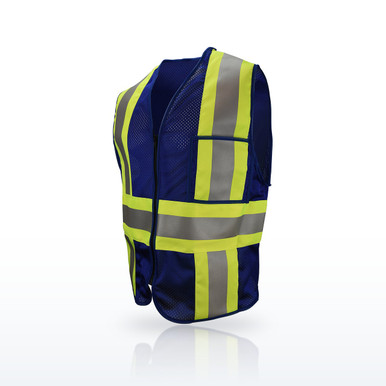 Radwear USA Hi-Vis Vests, CSV22 Custom Type O Class 1 Safety VestRadwear USA CSV22 custom Type O Class 1 vest: black, blue or red mesh, 2 in tape, zipper, made in USA, as Radians lists it
What a logo does and does not do to a rated vest. ANSI/ISEA 107-2020 fixes the fluorescent background colors (yellow-green, orange-red and red), their brightness, and the square inches of background and retroreflective material a garment must carry for Class 1, 2 and 3; the manufacturer certifies the garment to those minimums and prints the class on the label. A logo printed on the background covers a few square inches of it. If the garment still carries the required background area and the tape is untouched, the class stands; the live guides on this site already say so (“logo imprinting does not change the class if it stays within the area the standard allows; the imprint sits on the background, not the tape”). Printing over the tape, or covering so much background that the minimum is lost, is what would change it, and that is why the manufacturers mark a print area on each garment and why the proof is checked against it. This page answers the custom-vest questions in order: whether you can, where it goes, how it is printed, what the minimums and lead times are, and how to order.
Custom logo vests, question by question
The minimums, proof and lead-time statements are those on the Add Your Logo page on this site; the standard’s figures are as the live ANSI 107 guide quotes them.
The words on a custom vest order
The vocabulary of a logo order, in the order it comes up.
- Print area: the space the manufacturer marks on each garment where a logo may go; left chest, right chest and full back are the usual three. The proof places the logo inside it.
- Proof: the mock-up of the garment with the logo placed and sized, emailed free within one business day; nothing prints until it is approved.
- Minimum: 24 pieces for vests, shirts and jackets (mixed sizes count); hard hats 10 to 40 by brand; safety glasses 300; cooling towels 100.
- Lead time: about two to three weeks after proof approval, as the Add Your Logo page states; shorter dates are checked on request.
- Vector file: .ai, .eps, .pdf or .svg artwork that scales without blurring and separates into colors. A clear PNG or JPG is accepted.
- Heat transfer and screen print: the two surface methods used on hi-vis fabric. Embroidery stitches through and is kept to heavier garments.
- Background and tape minimums (ANSI/ISEA 107-2020): Class 1 217 sq in background and 155 tape; Class 2 775 and 201; Class 3 1,240 and 310; Class E 465 and 109. A logo on the background within the print area leaves both intact.
- Type O, R, P: off-road, roadway and public safety garment types. The PIP public-safety vests are Type P Class 2 with pre-printed FIRE, SECURITY or POLICE wording.
- Identification vest: a non-fluorescent vest (black, blue, red) with no 107 class, sold for company colors and visitor or role identification; Radians Radwear USA CSV22 and CSV6.
What can be printed, and the minimum for each
| Item | Minimum on the Add Your Logo page | Usual print areas | Rating kept? |
|---|---|---|---|
| Hi-vis safety vests (Type R Class 2 and 3) | 24, mixed sizes count | Left or right chest; full back between the tape | Yes, print on background inside the print area; tape untouched |
| Hi-vis shirts and T-shirts | 24 | Left chest; full back | Yes, same rule |
| Jackets, hoodies, bombers and rain jackets | 24 | Left chest; full back | Yes, same rule; FR garments need FR-rated transfers |
| Hard hats | PIP and Fibre-Metal 10; MSA 20; Studson 30; KASK 40 | Front, sides and back of the shell | Yes; a print is not a sticker and does not change the Z89.1 class |
| Safety glasses | 300 | Temple arm | Yes; the Z87 mark stays on frame and lens |
| Cooling towels | 100 | One end of the towel | No rating involved |
| Identification vests (black, blue, red) | 24 | Chest and back | No 107 class to keep; Type O Class 1 on the Radwear USA custom vests |
The imprint price is quoted on the proof by number of colors and quantity and is not printed on the product pages.
Source: Minimums, areas and process as stated on the Add Your Logo page on this site (Nov 9 2026); ANSI/ISEA 107-2020 as the live ANSI 107 guide quotes it; Radians and PIP product pages.
More questions people ask
Can a logo go on an FR hi-vis vest?
ML Kishigo’s FR FAQ: "In most cases, Kishigo can screen print your company’s logo on our flame resistant apparel." The 107 placement rules still apply: logos and title panels are allowed with "strict requirements for their placement so that worker identification can be accomplished without compromising the visibility requirements".
Answers from the sources named in the byline; ML Kishigo figures from the manufacturer’s product pages and spec sheets read Nov 12 2026.Questions people ask
Can I get a custom printed hi-vis vest?
Yes. Pick a garment with the “Add my company logo” option or use the Add Your Logo page; send the artwork, quantity and sizes; approve the free proof; the manufacturer prints and ships in about two to three weeks. Minimum 24.
Does a logo void the ANSI 107 rating?
Not when it sits on the fluorescent background inside the print area and stays off the retroreflective tape; the background and tape minimums the class rests on are untouched. Printing over tape would.
Where can I find a custom vest for work?
Here, nationwide. The Add Your Logo page takes the request; pre-printed FIRE, SECURITY and POLICE public safety vests (PIP 302-PSV) and plain company-color vests (Radians Radwear USA CSV22, CSV6) need no proof.
Where can I get custom vests with logos?
The same page; one request covers vests, shirts, jackets, hard hats, glasses and towels, and the proof comes within one business day.
Can I create my own safety vest?
An identification vest, yes; a rated one, no. ANSI/ISEA 107 certification is the manufacturer’s, and reflective tape or piping added at home does not make up the required area.
How many vests do I have to order to get a logo?
24, and mixed sizes count toward it. Hard hats are 10 to 40 by brand, safety glasses 300, cooling towels 100.
How long does a logo order take?
The price and proof within one business day; delivery about two to three weeks after the proof is approved. A sooner date can be asked for.
What file format do you need for a logo?
A vector file (.ai, .eps, .pdf or .svg) prints cleanest; a clear PNG or JPG also works, up to 25 MB. Text to print with it can be typed in.
Is the logo screen printed or heat transferred?
The manufacturer picks the method for the fabric and colors; both are surface methods used on hi-vis mesh and solid fabric. Embroidery is kept to heavier garments.
Can I put a logo on an FR or arc-rated vest?
Only with FR-rated transfers applied by the manufacturer; a non-FR print or patch adds non-FR material, which the live FR guides warn against. Ask on the request and the proof will say.
Where does the logo go on a safety vest?
Left or right chest in the fluorescent panel, or the full back between the shoulder and waist tape; never on the tape. The page’s builder shows the print area for each item.
Do safety vest colors have to be yellow or orange for a logo?
The rated colors are fluorescent yellow-green, orange-red and red, and a logo prints on any of them. Black, blue and red vests take a logo too but carry no 107 class.
Can I get a hard hat printed with a logo?
Yes, by the same proof process; PIP describes its Dom and Kilimanjaro shells as having large printing surfaces on front, sides and back. Minimum 10 for PIP and Fibre-Metal.
Is there a charge for the proof?
No. The price and proof are free and no card is needed; the imprint is priced on the proof by number of colors and quantity.
Related guides
What is hi-vis?And how retroreflective material worksANSI 107 Class 1, 2 and 3What the classes meanClass 2 vs Class 3 safety vestThe differenceAre yellow or orange safety vests better?What ANSI/ISEA 107 and the MUTCD sayWhat is enhanced visibility clothing?Why it is not Class 1, 2 or 3How long does hi-vis clothing last?And when should it be replacedML Kishigo questions answeredWho makes the line, the series names, where to buyThe ratings, test results and standards shown here are the manufacturers' published values, reproduced as published. Nothing on this page is a recommendation by Bayshore Safety that any product is suitable for a particular task, hazard or workplace. Selecting safety products and protective equipment is the responsibility of the end user and the employer, based on their own hazard assessment and the regulations that apply to their work. Confirm every value on the manufacturer's own documentation before use.
© 2026 Bayshore Safety & Industrial Supplies, Inc. All rights reserved. This guide may not be copied or republished without written permission.