Home › Guides › Gas detection › Bump test and turn off a BW Clip
Guide · Gas detection · Honeywell BW Clip how-to

How to bump test, zero and turn off a Honeywell BW Clip: activation, the operating-life countdown, the zero procedure, bump tests through IntelliDoX, hibernation on the 2-year H2S and CO versions, and why the Clip cannot be calibrated or switched off

The Honeywell BW Clip has no off switch and no user calibration: once activated it runs continuously for its 2- or 3-year operating life and then deactivates itself. What you can do is zero it (hold the button through a 5-second countdown in clean air; ZErO, then PASS), bump test it (Honeywell’s guide points to an IntelliDoX or MicroDock II dock as the logged method; a manual bump with gas above the low alarm also proves the alarms) and, on the 2-year H2S and CO versions only, hibernate it for 7 days to 12 months in the hibernation case or through IntelliDoX, which pauses the countdown with all safety functions off. The BW Clip Real Time is the version with a live reading that can be calibrated. This page follows Honeywell BW’s operator guide step by step.
Bayshore Safety. Industrial safety and PPE supplier since 2017. · Current as of November 2026 · Honeywell BW Clip operator manual / quick reference guide (50115903-067, OM-EN-PALO-A8: safety information, activation, operating life, alarms, zero procedure, bump tests, event logs, hibernation, factory alarm set points and warranty); Honeywell BW Clip datasheet (Rev A, 07/23); Honeywell BW Clip4 datasheet; IntelliDoX datasheet; the Honeywell BW product pages (automation.honeywell.com, fetched Nov 10 2026)
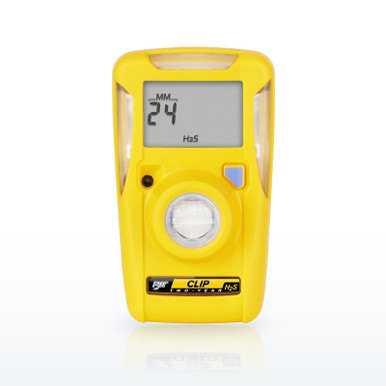
BW Technologies BWC2-H Clip H2S Monitor, 10/15 ppm Alarms, 2-yearBW Technologies BWC2-H Clip H2S Monitor, 10/15 ppm Alarms, 2-yearHoneywell BW prints 0 to 100 ppm, 10 ppm low and 15 ppm high alarms, a 2-year operating life from activation, IP66/67 and 92 g for the Clip H2S

Why "how do I turn off the Honeywell gas detector" needs a page. Because on the BW Clip the answer is that you do not. The Clip is a maintenance-free detector: Honeywell’s datasheet says "just turn on the device and it runs continuously, no need for calibration, sensor replacement, battery replacement or battery charging", and the operating-life countdown on its screen runs from the moment of activation to the day it switches itself off. The things people try to do with a serviceable detector (calibrate, power down, change the sensor) do not apply, and the things that do apply (zero, bump, hibernate, read the symbols, read the countdown) have their own rules in the operator guide. This page goes through them, and the Clip Real Time and Clip4, which differ, are covered where they differ. The MicroClip and MAX XT II pages linked below are for the serviceable Honeywell BW detectors.

The BW Clip, question by question

Quotations are from the BW Clip operator guide (50115903-067) and datasheet.

What is a Honeywell BW Clip H2S, and what does it cost?A single-gas, maintenance-free detector for hydrogen sulfide: "BW Clip is a portable, single-gas detector manufactured by BW Technologies by Honeywell (BW). BW Clip continuously measures the concentration of a specific gas in the ambient environment, and activates an alarm when concentrations exceed alarm setpoints." The H2S version reads 0 to 100 ppm with 10 ppm low and 15 ppm high alarms as the most common defaults (versions with 5/10 and 5/15 ppm are also sold); the CO version 0 to 300 ppm at 35 and 200 ppm (25/100 and 50/200 versions sold); the O2 version 0 to 25 percent at 19.5 and 23.5 percent; the SO2 version 0 to 100 ppm at 5 and 10 ppm (a 2/4 version sold). Honeywell BW lists 92 g (3.2 oz), 1.6 by 2.0 by 3.4 inches, IP66/67, a 95 dB alarm with visual and vibrating alarms, −40 to +122 °F for H2S, and the operating life as the battery life: two years for all four gases, three years for the H2S and CO 3-year versions. The current price is on each row in the band.
How do I activate a new BW Clip?The guide: 1. "Move to a normal atmosphere (20.9% v/v O2) that is free of hazardous gas." 2. "Press and hold the pushbutton until a 5 second countdown is displayed, and then continue to hold until the countdown is complete." 3. The LCD and LEDs turn on and off and the detector runs an internal diagnostic test. 4. The alarm set points are displayed and the LEDs flash. 5. The sensor stabilization countdown runs, with the detector vibrating for 20 seconds; the time depends on the sensor. 6. When the gas type and the operating-life countdown are displayed the detector is in normal operation. Honeywell’s caution: activate the detector before the activation date on the package, because the shelf life before activation is limited (one year for H2S, CO and SO2, six months for O2 on the datasheet).
How do I turn off the Honeywell BW Clip?You cannot. There is no deactivation in the operator guide; the only ways a Clip stops are the end of its operating life ("When the operating life countdown ends, the detector deactivates and detector safety functions are disabled"), the diagnostic fail-safe after a failed internal test (the detector beeps and vibrates, the LEDs flash twice a second for 15 seconds, "OFF or an error code is displayed. The detector is deactivated"), and hibernation on the 2-year H2S and CO models. Pressing the button in normal operation does not turn it off; it scrolls through events and settings (peak reading, time of peak, low and high set points, the clock, firmware version, next bump due, and Hib on hibernation models). If you need a single-gas detector that switches off and on, the Honeywell BW Solo and the MSA ALTAIR 2X are the serviceable ones in these two lines.
What is the operating-life countdown, and what happens at the end?"When the detector is activated for the first time, the operating life countdown is displayed. The countdown displays remaining operating life in months until the countdown reaches 90 days or less before expiry", then in days, then at 24 hours or less in hours with the EXPIRY! warning and the non-compliance symbol. At zero the detector deactivates, safety functions stop, and "it is possible to retrieve event logs for a limited time after expiry"; EXPIRY! and the non-compliance symbol are shown for up to 30 days after. The warranty is "two or three years from activation (given normal operation), plus one year shelf life (6 months for O2)", and the two-year figure assumes about 2 minutes of alarm time per day; "battery life decreases rapidly when the detector is in alarm condition". A detector in alarm all day will not reach its printed life.
How do I zero a BW Clip, and how often?The guide: "Over time and through use, the sensor baseline at zero exposure may drift from the manufacturer’s baseline"; for O2 models BW’s instruction is to zero the sensor once every 24 hours or when the automatic zero reminder is displayed, and for the other models to zero it periodically. Procedure: 1. Move to a normal atmosphere (20.9 percent O2) free of hazardous gas. 2. Press and hold the button until a 5-second countdown shows, and keep holding until it completes. 3. ZErO is displayed while the zero runs. 4. PASS, then normal operation. 5. If it fails, FAIL and the non-compliance symbol show and the non-compliance LED flashes; press the button to acknowledge, zero again, and if it fails twice contact Honeywell BW. The O2 model shows the zero-reminder symbol when more than 24 hours have passed since the last successful zero.
How do I bump test a BW Clip?The safety information at the front of the guide is the rule: "Periodically test the response of the sensor by exposing the detector to a target gas concentration that exceeds the low alarm setpoint. Manually verify that the audible and visual alarms are activated", and "bump test the detector in a normal atmosphere that is free of hazardous gas." Honeywell’s preferred method is a bump test through a dock: "Bump tests performed via an IntelliDoX or MicroDock II station are logged as bump tests. Manual bump tests are logged as unsafe gas concentrations." A manual bump is gas from a cylinder through a test cap or a bag over the sensor until the alarm sounds, flashes and vibrates; it proves the detector but the record shows a gas event, not a bump. If the detector is configured to show a bump reminder, the bump symbol appears when a bump is due, and with the non-compliance indicator enabled the LEDs flash until a successful bump is logged by a dock. The IntelliDoX datasheet gives a 10-second FastBump for the Clip; the DX-CLIP module and nest are in the band.
Can a BW Clip be calibrated?No. The datasheet draws the line between the two models: "BW Clip provides standard operation and no calibration; BW Clip Real Time includes a real-time gas level display and the ability to calibrate the device." The standard Clip ships with a factory calibration certificate and is bump tested and zeroed for the rest of its life; its alarm set points can be configured before activation and adjusted during its life through IntelliDoX with Fleet Manager II, but its span is not user-adjustable. The Clip Real Time (BWC2R and BWC3R in the band) adds the live reading, a calibration reminder and user calibration.
What do the alarm patterns and symbols mean?Low alarm: "Audible: 1 beep per second; Visual: 1 flash per second; Vibration: 1 vibration per second." High alarm, and over-limit (OL) or under-limit (−OL) when the gas is beyond the sensor range: 2 per second of each. The alarm persists until the concentration returns to an acceptable range; the gas reading during an alarm is shown only if that option is enabled. Symbols: the pushbutton prompt (hold until it disappears), percent by volume (O2 models) or ppm, the low and high alarm symbols, the non-compliance warning (a failed diagnostic, zero or bump, a bump due, a gas event if enabled, and the last 24 hours of life), the real-time clock, the end-of-life warning, the peak reading (a maximum gas event in the last 24 hours), the bump test reminder and, on O2 models, the 24-hour zero reminder; the countdown shows months (MM) or days (DD).
What is hibernation, and how do I use the hibernation case?Honeywell’s pause for the 2-year H2S and CO detectors only: "When Hibernation is activated, the operating life countdown is suspended. Use Hibernation to deactivate the detector for 7 days or longer, up to a maximum of 12 months. When Hibernation is activated, all detector safety functions are disabled." With the case (CLIPHB-CASE): in clean air, in normal operation, press the button to scroll until Hib shows, hold through the 5-second countdown, and while the 20-second hibernation counter runs place the detector in the case and close it firmly; open the case to reactivate. Through IntelliDoX: enable Hibernation on Insertion in Fleet Manager II, insert the detector, and it enters hibernation after its logs are retrieved; to reactivate, hold the button through the 5-second countdown until the LCD and LEDs cycle and the gas type and remaining life return. The datasheet notes hibernation can extend a two-year H2S or CO detector’s life by the time hibernated, "limited to 24 months of detector operation".
What does the non-compliance symbol mean, and why are the LEDs flashing?The non-compliance warning shows when "an internal diagnostic test fails; a bump test or zero procedure fails; a bump test is due, if enabled; the sensor is exposed to a gas concentration that exceeds alarm setpoints, if enabled", and permanently in the last 24 hours of life and for 30 days after expiry. It clears 24 hours after the last alarm or on a successful dock bump. With Non-compliance after gas exposure enabled, the LEDs flash in an alternating pattern (top LEDs 30 seconds, side LEDs 30 seconds, repeating) until then; pressing and releasing the button suspends the flashing for up to 10 minutes, which the guide says to do before a MicroDock II bump so the test reads normally. A detector that "performs one internal diagnostic test every 24 hours" and fails it goes to the diagnostic fail-safe and deactivates.
What does the BW Clip log, and how do I get the records out?"The detector stores the last 35 events that occurred, including peak readings, bump tests and auto zeros", each with the serial number, sensor type and life remaining, the event count, event type and duration, alarm level in ppm or percent, time since the alarm, and alarm duration. Use Fleet Manager II via an IntelliDoX (the most recent 35 events) or MicroDock II (10 events) to transfer them to a computer; pressing the button recalls the peak reading and its time on the detector itself.
What is the BW Clip4, and is it the same?A four-gas version of the idea: LEL, O2, H2S and CO with "two years of non-stop runtime with no charging or battery swap outs", IP68, 233 g, the same 24-hour self-test, bump reminders and IntelliDoX compatibility (DX-BWC4), and a full two-year warranty including sensors and battery, as the Clip4 datasheet states. Like the Clip it is bump tested rather than calibrated by the user and runs its life out; its own quick reference guide is the authority for its button sequences.

The BW Clip in plain words

  • Activate in clean air by holding the button through a 5-second countdown; the operating-life countdown then runs to the end.
  • There is no off switch and no user calibration on the standard Clip; the Clip Real Time can be calibrated.
  • Zero it in clean air by holding the button through the countdown (ZErO, PASS); O2 models every 24 hours.
  • Bump it against gas above the low alarm; a dock (IntelliDoX, MicroDock II) logs it as a bump, a manual test logs as a gas event.
  • Low alarm is one beep, flash and vibration per second; high and over-limit are two per second.
  • Hibernation (2-year H2S and CO only): the case or IntelliDoX pauses the countdown for 7 days to 12 months with safety functions off.
  • Activate before the date on the package; alarm time shortens the life; the last 35 events are retrievable through a dock.
BW Clip operator guide (50115903-067) and datasheet; Clip4 and IntelliDoX data sheets. Fetched Nov 10 2026.

Questions people ask

How do I turn off the Honeywell gas detector?

A BW Clip cannot be turned off; it runs for its 2- or 3-year life and deactivates itself. Only the 2-year H2S and CO versions can be hibernated. The MicroClip and MAX XT II turn off by holding the button through the OFF countdown.

How can I calibrate my Honeywell gas detector?

The standard BW Clip cannot be user calibrated; it is zeroed and bump tested. The Clip Real Time, MicroClip, MAX XT II and Solo are calibrated through their own procedures, linked below.

How to turn off a Honeywell BW Clip O2?

It has no off function and no hibernation (hibernation is for 2-year H2S and CO models); it runs its two-year life and switches itself off at the end.

What is a BW Clip H2S?

Honeywell BW’s maintenance-free single-gas H2S detector: 0 to 100 ppm, 10 and 15 ppm alarms as shipped, a 2- or 3-year operating life, IP66/67, 92 g.

How do I zero a BW Clip?

In clean air hold the button through the 5-second countdown; ZErO shows, then PASS. O2 models ask for it every 24 hours.

How do I bump test a BW Clip?

Expose it to gas above the low alarm and confirm the beep, flash and vibration; Honeywell says a dock bump (IntelliDoX or MicroDock II) is the logged method and manual bumps log as gas events.

How do I reset a BW Clip?

There is no reset; a failed zero or bump is acknowledged with the button and repeated, and a diagnostic failure deactivates the detector permanently.

What does the EXPIRY! warning mean?

The operating life has 24 hours or less to run, or has ended; the detector will deactivate and must be replaced.

What is hibernation on a BW Clip?

A pause of the operating-life countdown for 7 days to 12 months on 2-year H2S and CO models, through the hibernation case or IntelliDoX, with all safety functions off while hibernated.

Why is my BW Clip flashing when there is no gas?

The non-compliance indicator: a failed or due bump or zero, a gas event in the last 24 hours, or the last day of life. A dock bump clears it; pressing the button pauses the flashing for 10 minutes.

How long does a BW Clip last?

Two years from activation for all four gases, three years for the 3-year H2S and CO versions, assuming about 2 minutes of alarm a day; alarm time shortens it.

What is the price of the Honeywell BW Clip H2S?

On its row in the band; the 2-year, 3-year and alternative set-point versions are priced separately.

Can I change the alarm set points on a BW Clip?

Before activation, and during its life through IntelliDoX with Fleet Manager II, as Honeywell BW states; not on the detector itself.

How to calibrate a Honeywell BW Icon?

The Icon is a separate Honeywell BW model with its own guide; the Icon+ configurations we listed are no longer on Honeywell’s site and have been withdrawn, so we do not stock it.

The ratings, test results and standards shown here are the manufacturers' published values, reproduced as published. Nothing on this page is a recommendation by Bayshore Safety that any product is suitable for a particular task, hazard or workplace. Selecting safety products and protective equipment is the responsibility of the end user and the employer, based on their own hazard assessment and the regulations that apply to their work. Confirm every value on the manufacturer's own documentation before use.

Need monitors matched to the gases on your permit?Call (925) 215-7337 or email us the gases in your hazard assessment and where people work, and we will quote the monitors, calibration gas and docks with the manufacturer figures listed. We service and calibrate portable gas instruments and sell nationwide.
Gas detection selector
How to buyCard, purchase order or invoice terms; quotes on request; agencies and institutions welcome.
Live Service & SupportReal people who know the products, Monday to Friday 7:30am to 4pm Pacific. 925-215-7337
We DeliverWe ship nationwide. Parcel and LTL freight to job sites and businesses across the U.S.