
How to calibrate a Honeywell BW MicroClip XL (GasAlertMicroClip XL, XT and X3): the bump test, the auto zero and auto span, what the error and CAL FAILURE messages mean, how to turn it on and off, how often to calibrate, and the calibration gas
To calibrate a Honeywell BW MicroClip XL: in clean air, press and hold the button through the OFF countdown, keep holding as the detector briefly deactivates and reactivates, and keep holding through the CAL countdown; the detector auto-zeroes the LEL, H2S and CO sensors and calibrates the oxygen sensor (do not apply gas until APPLY GAS shows), then you fit the calibration cap, open a 0.5 L/min regulator on the quad cylinder (CO 100 ppm, H2S 25 ppm, 50 percent LEL, 18 percent O2) and let the span run about two minutes until CAL DUE shows. Honeywell’s manual says bump test before each day’s use and calibrate at least every 180 days. An "Err" above a gas name is a failed sensor self-test; "error 02" is almost always Err over O2, the oxygen channel.
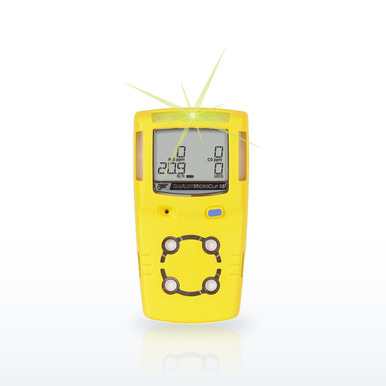 BW Technologies MCXL-XWHM-Y-NA MicroClip XL 4-Gas Monitor, LEL/O2/H2S/COHoneywell BW lists the MicroClip XL at 18 hours per charge, IP68, 190 g, Class I Div 1 Groups A, B, C, D and a two-year warranty
Why the MicroClip gets its own page. It is the four-gas detector with one button, and that one button does everything: on, off, calibration, bump acknowledgement, alarm acknowledgement. The questions people ask (how do I calibrate it, what does the error mean, how do I turn it off, what is CAL FAILURE, what gas do I use) all come down to what the manual says that button does and what the screens mean, and this page quotes the GasAlertMicroClip user manual for each. The MicroClip XL and X3 share the manual with the older XT; where they differ (battery, oxygen sensor, warranty) the difference is stated. The parts the manual names, the sensors, cylinder, regulator, IR link and IntelliDoX dock, are in the band at current prices.
The MicroClip, question by question
Quotations are from the GasAlertMicroClip user manual and the MicroClip datasheet.
The MicroClip XL in plain words
- One button: hold to turn on; hold through OFF to turn off; hold through OFF and then CAL to calibrate; press to acknowledge alarms.
- Bump before each day’s use with the quad gas; the alarms must sound, flash and vibrate.
- Calibrate at least every 180 days in clean air, never during or just after charging; apply gas only when APPLY GAS shows.
- Gas: CO 100 ppm, H2S 25 ppm, LEL 50 percent (2.5 percent methane), O2 18 percent; 0.5 L/min regulator; the values in the detector must match the cylinder.
- "Err" above a gas is a failed sensor; stabilize, calibrate, then replace. "Error 02" is Err over O2.
- Factory alarms: O2 19.5/23.5, LEL 10/20 percent, CO 35/200 ppm, H2S 10/15 ppm, adjustable.
- Settings need the IR link and Safety Suite Device Configurator, or the IntelliDoX dock.
Questions people ask
How do I calibrate my BW GasAlert MicroClip XL?
In clean air hold the button through the OFF countdown and the CAL countdown, let it auto-zero, then at APPLY GAS fit the cap and open the 0.5 L/min regulator on the quad cylinder; the span takes about two minutes and ends at CAL DUE.
What does the error "02" mean on a BW GasAlert MicroClip XL?
There is no code 02; it is Err over O2, a failed oxygen-sensor self-test or zero. Let it stabilize, calibrate in clean air, and replace the sensor if it repeats, as the manual directs.
How do I turn off a MicroClip XL?
Press and hold the button until OFF and the countdown finish; if you let go early it stays on.
How often should a MicroClip XL be calibrated?
At least once every 180 days per the manual, with a bump test before each day’s use and a calibration of any new sensor.
What calibration gas does the MicroClip XL take?
A quad mix of 100 ppm CO, 25 ppm H2S, 50 percent LEL (2.5 percent methane) and 18 percent O2, matching the span values set in the detector; Honeywell names the CG-Q34-4 cylinder and REG-0.5 regulator.
How do I bump test a MicroClip?
Apply the quad gas through the calibration cap until all three alarms activate; Honeywell says before each day’s use, and the IntelliDoX dock does it and logs it.
What does CAL FAILURE mean on a MicroClip?
The last calibration failed for a sensor; the previous calibration stays valid until its due date, and the detector asks for a new calibration (or refuses to run if Force Calibration is on).
Why won’t my MicroClip calibrate?
The manual’s causes: gas applied before APPLY GAS, an empty or expired cylinder, a bad regulator, a disabled sensor, calibration during or right after charging, or a sensor at the end of its life.
What are the MicroClip XL factory alarm set points?
O2 19.5 and 23.5 percent, LEL 10 and 20 percent, CO 35 and 200 ppm (TWA 35, STEL 50), H2S 10 and 15 ppm (TWA 10, STEL 15), adjustable and shown at every start-up.
How long does a MicroClip XL run?
18 hours per charge on the XL and X3 (12 hours at −4 °F), recharging in under six hours; the older XT ran 10 hours.
Can I change MicroClip settings without the IR link?
No; span values, set points, intervals and locks are set in Safety Suite Device Configurator through the IR link or the IntelliDoX dock.
Which sensor replaces the oxygen sensor in a MicroClip XL?
The Honeywell BW SR-X2V oxygen sensor listed in the band; the MC2-SS-K1 kit covers the sensor set. Calibrate any new sensor before use.
How much is a Honeywell BW MicroClip XL?
The price is per configuration on each row in the band; the four-gas version in yellow or black is the most common.
Related guides
Bump test vs calibrationWhat each does and how oftenWhat is calibration gas?And how to choose the right cylinderGas detector docking stationsWhat they do and what OSHA saysHow to calibrate a Honeywell BW MAX XT IIThe pump test, zero and span, and the ERR messagesHow to bump test, zero and turn off a Honeywell BW ClipActivation, hibernation and the end-of-life countdownWhat are the alarm set points on a gas monitor?H2S, CO, O2 and LEL defaults as BW and MSA ship themThe ratings, test results and standards shown here are the manufacturers' published values, reproduced as published. Nothing on this page is a recommendation by Bayshore Safety that any product is suitable for a particular task, hazard or workplace. Selecting safety products and protective equipment is the responsibility of the end user and the employer, based on their own hazard assessment and the regulations that apply to their work. Confirm every value on the manufacturer's own documentation before use.