
How to calibrate a Honeywell BW MAX XT II (GasAlertMax XT II): the pump test, zero and span, what ERR and the error screens mean, how to turn it off, how often to calibrate, and the calibration gas, regulator and hose it takes
To calibrate a Honeywell BW MAX XT II: activate it in clean air with the diffusion cover on (the pump will not run its start-up test without it), then press and hold the button through the OFF countdown and keep holding through the CAL countdown; the detector auto-zeroes the LEL, H2S and CO sensors and calibrates the oxygen sensor, and when APPLY GAS shows you connect the hose from a 0.5 L/min or demand flow regulator on the quad cylinder to the pump inlet; the span runs about two minutes and ends at CAL DUE. The manual asks for a bump test before each day’s use, a calibration at least every 180 days, and a hose no longer than 3 ft for calibration. "ERR O2" is the oxygen sensor failing its self-test or zero, and this page covers what to do.
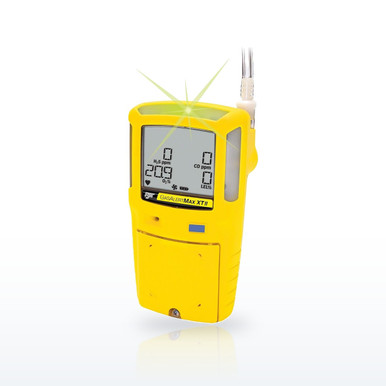 BW Technologies XT-XWHM-Y-NA Max XT II 4-Gas Monitor, LEL/O2/H2S/COHoneywell BW lists the MAX XT II at 13 hours per charge, IP66/67, a pump that samples through up to 75 ft of hose, and a two-year warranty including all sensors
Why the MAX XT II gets its own page. It is the Honeywell BW detector with the pump, the one that draws a sample from a manhole, tank or pit through a hose before anyone goes in, and the pump adds steps the MicroClip page does not have: the start-up pump test, the block test, the pump alarm, the hose length limits and the filters. The questions people ask (how do I calibrate it, what is ERR O2, what does error code 02 mean, how do I reset it) are answered in the BW MaxXT II user manual, and this page quotes it. The parts the manual names are in the band at current prices.
The MAX XT II, question by question
Quotations are from the BW MaxXT II user manual (129541-L3 Rev G).
The MAX XT II in plain words
- Diffusion cover on before activation, or the pump test does not run; hose no longer than 75 ft for sampling and 3 ft for calibration.
- One button: hold through OFF to turn off; hold through OFF and CAL to calibrate; press to acknowledge latched, pump and Due Today alarms.
- Bump before each day’s use with gas above the high set points; calibrate at least every 180 days and after any sensor change.
- Gas: CO 100 ppm, H2S 25 ppm, LEL 50 percent, O2 18 percent; CG-Q34-4 or CG-Q58-4 cylinder; 0.5 L/min or demand flow regulator.
- A span fails if 50 percent of the gas is not seen within 30 seconds or drops below 50 percent during the two-minute span; new cylinder, new regulator, new hose, then the sensor.
- ERR above a gas is a failed sensor; "error 02" is ERR O2, the oxygen sensor; stabilize, zero in clean air, calibrate, replace.
- Factory alarms: O2 19.5/23.5, LEL 10/20 percent, CO 35/200 ppm, H2S 10/15 ppm, adjustable.
Questions people ask
How do I calibrate my Honeywell BW MAX XT II 4-gas detector?
Activate it with the cover on, hold the button through OFF and then CAL, let it auto-zero, and at APPLY GAS connect the hose from the regulator on the quad cylinder to the pump inlet; the span runs about two minutes and ends at CAL DUE.
What does error code 02 mean on a GasAlert MAX XT II?
There is no code 02; it is ERR over O2, the oxygen sensor failing its self-test or zero. Acknowledge, stabilize, reactivate in clean air, calibrate, and replace the SR-X2V sensor if it repeats.
My MAX XT II displays an ERR O2 error. How do I reset it?
Press the button to acknowledge, let the sensor stabilize, turn the detector off and on in clean 20.9 percent air so the start-up auto zero runs, then calibrate; a sensor that fails again is replaced and calibrated.
How do I turn off a MAX XT II?
Press and hold the button until the OFF countdown completes; release it early and the detector stays on.
How often should a MAX XT II be calibrated?
At least every 180 days, with a bump test before each day’s use, per the manual.
What calibration gas does the MAX XT II use?
The quad mix (100 ppm CO, 25 ppm H2S, 50 percent LEL, 18 percent O2) in the CG-Q34-4 or CG-Q58-4 cylinder through a 0.5 L/min or demand flow regulator and a hose no longer than 3 ft.
What is the pump test on a MAX XT II?
A start-up check that the pump draws: with Force Block Test on, you block the hose end with a finger within 2.5 minutes and the detector confirms the pump; without the cover the test cannot run.
Why is my MAX XT II showing HIGH with a flashing pump symbol?
That is the pump alarm, not a gas alarm: the pump is blocked or stopped. Clear the hose, press the button, and let the block test re-run.
How long a hose can the MAX XT II sample through?
75 ft (22 m) as the manual states; the HOSE1-75 is that length. Calibration hose is limited to 3 ft.
What are the specifications of the Honeywell BW MAX XT II?
Four gases (LEL, O2, H2S, CO), integral pump, 13-hour battery with a 6-hour charge, IP66/67, 95 dB alarm, 375 hours of datalog, Class I Div 1 and ATEX/IECEx Ex ia IIC T4, two-year warranty including sensors, as Honeywell BW prints them.
What is the price of the Honeywell BW MAX XT II?
Per configuration; the current price is on each row in the band, with the confined space kit priced separately.
What are the MAX XT II factory alarm set points?
O2 19.5 and 23.5 percent, LEL 10 and 20 percent, CO 35 and 200 ppm, H2S 10 and 15 ppm, with TWA and STEL on the toxics; adjustable, and set to zero to disable.
Does the MAX XT II work with IntelliDoX?
Yes, with the DX-MAXXT module; the dock bump tests, calibrates and configures it and transfers the logs.
Related guides
Bump test vs calibrationWhat each does and how oftenGas detection for confined space entryWhat to test and the orderWhat is calibration gas?And how to choose the right cylinderHow to calibrate a Honeywell BW MicroClip XLBump test, calibration, error messages and turning it offHow to calibrate and bump test an MSA ALTAIR 5XZero, span, the pump test and the sensor-life warningIs H2S heavier than air?And where it collectsThe ratings, test results and standards shown here are the manufacturers' published values, reproduced as published. Nothing on this page is a recommendation by Bayshore Safety that any product is suitable for a particular task, hazard or workplace. Selecting safety products and protective equipment is the responsibility of the end user and the employer, based on their own hazard assessment and the regulations that apply to their work. Confirm every value on the manufacturer's own documentation before use.