
How to calibrate and bump test an MSA ALTAIR 5X: the pump test, zero and span calibration, the calibration check, the GALAXY GX2 option, the end-of-sensor-life warning, how often to calibrate, what the 5X detects, what "COMB" means and what it costs
The ALTAIR 5X is MSA’s pumped multigas detector, reading up to six gases through an integral pump. To calibrate it, in fresh air press the up button for five seconds at the measurement page, confirm ZERO with the power button (SENSOR REFRESH, then ZERO CALIBRATION with a progress bar, then ZERO CALIBRATION PASS), connect the demand flow regulator and cylinder to the pump inlet, and press the power button at SPAN; the display shows SPAN CALIBRATION PASS or FAIL for each sensor. The daily calibration check is the same gas applied in measuring mode with the readings compared to the cylinder label; MSA requires it before each day’s use. This page follows MSA’s operating manual and FAQ step by step.
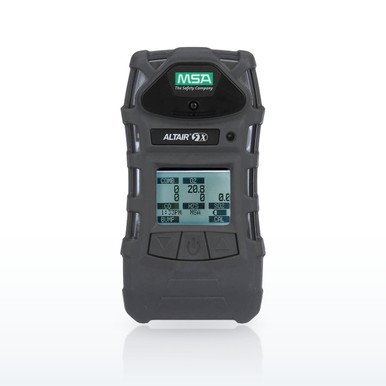 MSA 10116924 ALTAIR 5X 4-Gas Monitor, LEL/O2/H2S/CO, Monochrome displayMSA lists the ALTAIR 5X as measuring up to 6 gases with an integral pump, XCell sensors, a 10-foot drop test and IP65 construction
Why the 5X has its own page. It is the sample-draw instrument in MSA’s line, the one that tests a manhole, tank or pit from outside before anyone goes in, and its pump, its larger sensor set (SO2, NH3, Cl2, ClO2, HCN, PH3, NO2, CO2 and a PID as configured) and its reactive-gas calibration rules give it questions the 4XR page does not cover. MSA’s operating manual and FAQ answer them, and the parts named in those answers (sampling lines, demand regulators, the reactive-gas maintenance kit, the PID lamp, the GALAXY GX2 stand) are in the band at current prices. The general bump-test guide linked below covers the reasons; this page is the procedure.
The ALTAIR 5X, question by question
Quotations are from the ALTAIR 5X operating manual and FAQ; the price is on each row in the band.
The ALTAIR 5X in plain words
- Pumped multigas detector: up to six gases, PID or IR CO2 options, integral pump, IP65, 10-foot drop test, UL/CSA/ATEX/IECEx as MSA lists them.
- Calibration check every day before use: gas through the demand regulator to the pump inlet, readings within the cylinder limits.
- Calibrate: up button five seconds, confirm ZERO (SENSOR REFRESH, progress bar, PASS), then gas on the inlet and power at SPAN; PASS or FAIL per sensor.
- A failed span is retried with fresh gas and sound tubing before a sensor is blamed; the heart symbol is the end-of-sensor-life warning.
- Reactive gases (Cl2, NH3, ClO2) need a special regulator and short PTFE tubing dedicated to that gas.
- CAL DUE is settable from 1 to 180 days; the GX2 stand defaults to 30 days and bump/cal on fail.
- Shutdown: hold the power button through the bar. Charge in a safe area only. Bluetooth ended in July 2022.
Questions people ask
How do I calibrate an MSA ALTAIR 5X?
Hold the up button five seconds in fresh air, confirm ZERO with the power button, then connect the demand regulator and cylinder to the pump inlet and press power at SPAN; the display reads PASS or FAIL per sensor.
How often do you calibrate an MSA ALTAIR 5X?
A calibration check before each day’s use and a full calibration periodically and after any failed check, sensor change or battery change; the CAL DUE reminder runs from 1 to 180 days and the GX2 defaults to 30.
What does the MSA ALTAIR 5X detect?
Up to six gases: combustible (LEL, IR methane or IR CO2), oxygen and XCell toxic sensors for CO, H2S, SO2, NO2, NH3, Cl2, ClO2, HCN and PH3, plus a PID option for VOCs, as MSA lists them.
What is COMB on the ALTAIR 5X?
The combustible-gas channel: the catalytic sensor reading in percent LEL or percent methane, or the IR reading on an IR unit; MSA’s defaults are 0.5 percent CH4 low and 1 percent high.
How do you use the ALTAIR 5X?
Turn it on in fresh air, let the self-test and pump test run, accept any sensor change, do the calibration check, then sample through the line or wear it; the down button pages the readings and the up button clears them.
Where can I find the manual for the ALTAIR 5X?
On MSA’s ALTAIR 5X product page under documents, linked from our product pages; this guide follows operating manual 10150945 r02.
What is the price of the MSA ALTAIR 5X?
Per configuration; each row in the band carries the current price, and the PID version is the highest because of the PID sensor and lamp.
What is the typical life expectancy of the ALTAIR 5X?
MSA prints sensor lives (SO2 four years, NH3 and Cl2 three, O2 more than four) rather than an instrument life; sensors, filters, pump and battery are all replaceable.
How do I turn off the ALTAIR 5X?
Press and hold the power button until the HOLD BUTTON FOR SHUTDOWN bar completes.
Why did my ALTAIR 5X fail calibration?
MSA lists an empty or expired cylinder and bad tubing or fittings before a worn sensor, and says to retry before replacing the sensor; a sensor at end of life shows the blinking heart.
Does the GALAXY GX2 work with the ALTAIR 5X?
Yes, for the calibration check and calibration with a record; MSA notes it cannot test a chlorine dioxide sensor.
Can the ALTAIR 5X read CO2?
With the IR CO2 sensor option, 0 to 10 percent by volume, at 0.5 and 1.5 percent alarms as MSA ships it.
Does the ALTAIR 5X have Bluetooth?
Not on current units: MSA’s product page states Bluetooth has not been available on the 4XR and 5X since July 2022.
Why does chlorine need different tubing on the 5X?
MSA states reactive gases diffuse into rubber and plastic tubes and starve the calibration, so it requires a special regulator and short PTFE tubing dedicated to that gas.
Related guides
Bump test vs calibrationWhat each does and how oftenWhat is calibration gas?And how to choose the right cylinderGas detection for confined space entryWhat to test and the orderHow to calibrate, bump test and reset an MSA ALTAIR 4XRButtons, zero and span, the LEDs and the 4X differencesIs there a detector for high levels of carbon dioxide?Portable CO2 monitors, colorimetric tubes and appsGas detector sensor lifeWhen to replace sensorsThe ratings, test results and standards shown here are the manufacturers' published values, reproduced as published. Nothing on this page is a recommendation by Bayshore Safety that any product is suitable for a particular task, hazard or workplace. Selecting safety products and protective equipment is the responsibility of the end user and the employer, based on their own hazard assessment and the regulations that apply to their work. Confirm every value on the manufacturer's own documentation before use.