Home › Guides › Gas detection › Calibrate and reset an ALTAIR 4XR
Guide · Gas detection · MSA ALTAIR 4XR how-to

How to calibrate, bump test and reset an MSA ALTAIR 4XR (and ALTAIR 4X): the three buttons, zero and span, the calibration check, the green, red and yellow LEDs, MotionAlert and InstantAlert, Bluetooth, how often to calibrate, and 4X vs 4XR

The ALTAIR 4XR runs on three buttons. To calibrate: in fresh air, press and hold the up button for three seconds, confirm ZERO with the power button (the instrument refreshes the sensors and zeroes them, and spans the oxygen sensor to 20.8 percent), then at the SPAN screen fit the calibration cap, connect the 0.25 L/min regulator and the MSA cylinder (1.45 percent CH4, 15 percent O2, 60 ppm CO, 20 ppm H2S), open the valve and press the power button; the display shows SPAN PASS or the sensor that failed. A bump test (MSA calls it a calibration check) is the same gas applied in measuring mode, before each day’s use, with the readings checked against the cylinder. "Reset" means one of three things, each a button press, and this page goes through them.
Bayshore Safety. Industrial safety and PPE supplier since 2017. · Current as of November 2026 · MSA ALTAIR 4XR product page (us.msasafety.com, fetched Nov 10 2026); ALTAIR 4XR bulletin (0816-102-MC, 11.2023); ALTAIR 4XR quick start guide (0816-105-MC); ALTAIR 4X operating manual (10128754, MSHA version) for the button, LED, calibration-check and calibration procedures the 4XR shares; ALTAIR 5X FAQ (0802-85-MC) for MotionAlert and InstantAlert; GALAXY GX2 quick start guide (0818-25-MC)
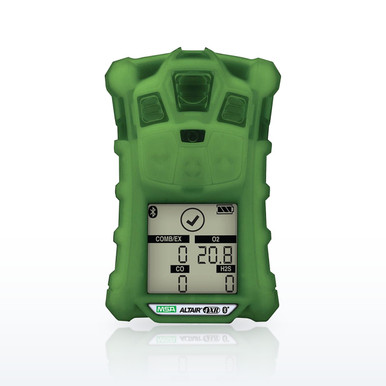
MSA 10178558 ALTAIR 4XR 4-Gas Monitor, LEL/O2/H2S/CO, Glow-in-the-Dark CaseMSA 10178558 ALTAIR 4XR 4-Gas Monitor, LEL/O2/H2S/CO, Glow-in-the-Dark CaseMSA states a 20-hour run time, under 4-hour charge, IP68, 25 drops from 4 ft, −40 °F to +140 °F and a 4-year instrument and sensor warranty

Why a page for one instrument. The ALTAIR 4XR is the four-gas detector most of the crews we sell to carry, and the questions people ask about it are not answered by a general calibration guide: which button is which, what the flashing lights mean, what "reset" does, how it differs from the 4X it replaced, and what the daily check is supposed to look like. MSA’s own documents answer all of them, and this page puts those answers in one place with the parts listed below at current prices. The procedures are quoted from the MSA ALTAIR 4X operating manual, which the 4XR shares (the 4XR quick start guide describes the same three-button operation and refers the user to section 3.10 of its own manual for calibration); the figures that differ between the two models are from the 4XR bulletin and product page. The general bump-test and calibration guide linked below covers the why; this page is the how.

The ALTAIR 4XR, question by question

Quotations are MSA’s; where the 4XR differs from the 4X the difference is stated.

What is an MSA ALTAIR 4XR, and what gases does it detect?A four-gas personal monitor built on MSA’s XCell sensors: combustible gas 0 to 100 percent LEL at 1 percent resolution, oxygen 0 to 30 percent at 0.1 percent, carbon monoxide 0 to 1,999 ppm at 1 ppm, hydrogen sulfide 0 to 200 ppm at 1 ppm, with H2S-LC (0 to 100 ppm at 0.1 ppm), SO2 (0 to 20 ppm) and NO2 (0 to 50 ppm) sensors as alternatives in the toxic positions. MSA lists it at 8 oz (228 g), 4.4 by 3.0 by 1.4 inches, a 20-hour run time on its rechargeable lithium-polymer battery with under a 4-hour charge, IP68 (waterproof to 6 ft for 1 hour), −40 to +140 °F, MIL-STD-810G drop protection (25 drops from 4 ft, and an incidental 25 ft drop onto concrete) and a 4-year instrument and sensor warranty. The charcoal case is part 10178557 and the phosphorescent (glow-in-the-dark) case 10178558; the ATEX versions are 10178573 and 10178569.
What are the three buttons for?From the ALTAIR 4X manual, which the 4XR follows: the power button "is used to turn instrument ON or OFF and to confirm user action selections"; the down button "is used to page down through data screens in measuring mode", and "holding this button for 3 seconds while in Normal Measure mode activates the InstantAlert alarm"; the up button "is used to reset peak, STEL TWA and acknowledge alarms (where possible) or access calibration in Measuring mode". Pressing the up and power buttons together at start-up opens the Options Setup mode. Everything on the instrument is done with those three.
How do I turn the ALTAIR 4XR on and off, and what does it show at start-up?Press the power button to turn it on; it runs a self-test (all LCD segments, the alarm LEDs, a horn chirp and a vibration), then pages through the installed sensors, the low and high alarm set points, the STEL and TWA set points, the calibration values, the date and time, the last calibration date (on by default) and the cal-due date (off by default, set through MSA Link), and the Fresh Air Setup prompt. To turn it off, press and hold the power button until the instrument shuts down. Turning it off and on in fresh air is also the manual’s way of clearing the combustible-sensor lock after a reading over 100 percent LEL.
How do I calibrate an ALTAIR 4XR, step by step?MSA’s procedure in the ALTAIR 4X manual, section 3.9. Preparation: fresh air, a 0.25 L/min flow regulator ("Calibration must be performed using a flow regulator with a flow rate set to 0.25 liters per minute"), the calibration cap, tubing, and the MSA cylinder; if a charge was interrupted, let the instrument sit 30 minutes first. Zero: 1. In normal operation press and hold the up button for three seconds. 2. Enter the password if calibration lockout is on. 3. At the ZERO screen, with the instrument in fresh air, press the power button; "A sensor Refresh and Zero Calibration now occur", and the display shows ZERO PASS or ZERO ERR with the flag of any sensor that failed. MSA notes that during the zero the oxygen sensor is also span calibrated to 20.8 percent fresh air. (Pressing the up button at the ZERO screen skips to span; pressing the down button runs a Fresh Air Setup only.) Span: 1. At the SPAN screen, connect the calibration gas. 2. Fit the calibration cap: insert its tab in the slot, press it until it seats, press both side tabs down until they snap. 3. Connect the tubing from the cap to the regulator. 4. Open the regulator valve. 5. Press the power button; the LEDs flash and the span runs; the display shows SPAN PASS. Finish: close the valve and remove the cap; "the calibration procedure adjusts the span value for any sensor that passes the calibration test; sensors that fail calibration are left unchanged", and the instrument may briefly alarm on residual gas. The GALAXY GX2 stand runs the same sequence automatically.
How do I bump test an ALTAIR 4XR?MSA calls it a calibration check and requires it before each day’s use: "Perform a Calibration Check before each day’s use to verify proper instrument operation." The procedure (manual section 3.8): turn the instrument on in clean air and confirm it reads no gas; fit the calibration cap; attach the regulator to the cylinder and the tubing to the cap; open the valve (0.25 L/min); the readings "should be within the limits stated on the calibration cylinder or limits determined by your company"; if they are not, calibrate. MSA says the check "is simple and should only take about one minute". On the 4XR the product page adds a bump LED and an on-screen checkmark that show the check passed, and the bulletin states the 4XR bumps and calibrates "with 1/2 the test gas and in 1/2 the time vs. industry average". The GX2 stand does the check automatically, at a set time of day if you choose.
What calibration gas does the ALTAIR 4XR use, and how often should it be calibrated?The bulletin names the mix: 1.45 percent methane, 15 percent oxygen, 60 ppm carbon monoxide and 20 ppm hydrogen sulfide, in a 34-liter cylinder (10048280) or a 58-liter cylinder (10045035), with a 0.25 L/min regulator; kit 10178356 ships the detector with the 34 L cylinder and regulator, and 10178357 adds the ALTAIR pump probe. For frequency MSA prints a rule, not a number: a calibration check before each day’s use, and "perform a full calibration periodically to ensure accuracy and immediately if the instrument fails the Calibration Check". The cal-due reminder, when enabled through MSA Link, counts the days; the GALAXY GX2 ships with a 30-day calibration interval as its default setting. The combustible sensor also needs calibrating after a lock-alarm exposure and whenever a sensor is replaced.
How do I reset an MSA ALTAIR gas detector?There are three resets, and the question usually means one of them. Reset the readings: page down to the PEAK, MIN, STEL or TWA screen and press the up button, which clears that value (the manual’s "to reset the peak readings: access the PEAK page, press the up button"). Reset an alarm: a latched alarm, a STEL or TWA alarm or a sensor-life alarm is acknowledged with the up button ("the unit remains in alarm state until the up button is pressed"), and the InstantAlert alarm is cleared the same way; the MotionAlert final alarm is cleared with the down button (MSA’s FAQ). Restart the instrument: press and hold the power button to turn it off, then on again in fresh air, which clears the catalytic sensor LockAlarm after a 100 percent LEL exposure. There is no factory reset on the keypad; set points and options are changed in Options Setup (up and power at start-up) or in MSA Link.
What do the green, red and yellow lights mean?From the manual’s LED table. Green: the Safe LED "flashes once every 15 seconds to notify the user that the instrument is ON and operating under the conditions defined" (no gas, no alarm, oxygen at 20.8 percent, no low battery); it can be turned off in MSA Link. Red: "the Alarm LEDs are visual indications of an alarm condition or any type of error in the instrument". Yellow: an instrument fault, lit for an instrument memory error, a missing sensor or a sensor error. Red/green at the charge port: red charging, green charged. A red LED flashing with the horn and vibrator is a gas alarm; the display names the gas and shows the alarm symbol, and the low battery warning repeats every 60 seconds with "LOW BATT" on the screen.
What does a flashing blue light on my ALTAIR 4XR mean, and how do I turn off Bluetooth?The ALTAIR 4X manual we hold lists green, red, yellow and the red/green charge LED and no blue one, and MSA’s product page states that "Bluetooth functionality is no longer available for ALTAIR 4XR, 5X, 5X IR, and 5X PID Multigas Detectors as of July 2022". On a 4XR built before that date with the wireless option, the Bluetooth indication and its on/off setting were in the instrument’s own manual and the MSA Link software; on current units there is nothing to turn off. If a current instrument shows a light the manual does not list, MSA’s customer service line (1-800-MSA-2222) is the source, and we will not guess at it here.
What are MotionAlert and InstantAlert?MSA’s FAQ: "MSA’s MotionAlert feature operation is very similar to that of a PASS device; first warnings and second warnings can be reset by moving the device and will alarm after 20 and then 24 seconds of no detected movement. Final alarm sounds after 30 seconds of no detected movement and can be reset only by pressing the DOWN button. MSA’s InstantAlert feature is activated by pressing and holding the DOWN button for five seconds. This alarm can only be cleared by pressing the UP button." The 4X manual gives three seconds for the InstantAlert hold; the FAQ, written for the 5X, says five. MotionAlert is turned on in Options Setup and shows a symbol on the display when active.
How do I read the ALTAIR 4XR screen?The main screen shows the gas types, their concentrations and the battery icon (each segment about 25 percent). The down button pages to the bump mode, the PEAK page (highest readings since turn-on or the last reset), the MIN page (lowest oxygen), the STEL page (the 15-minute average for the toxic gases) and the TWA page (the 8-hour average), each reset with the up button. The symbols: a cylinder means apply gas, a crossed cylinder means fresh air, an hourglass means wait, a checkmark means a passed bump or calibration, a heart means a sensor is near the end of its life, and a small figure means MotionAlert is on. The manual’s STEL warning is blunt: if the STEL alarm activates, leave the contaminated area immediately.
What is the difference between the ALTAIR 4X and the 4XR?Same three-button operation, same XCell sensors and the same calibration procedure; MSA’s FAQ states the LEL, O2, CO and H2S XCell sensors are shared with the 5X and interchangeable. What the 4XR bulletin adds over the 4X: a 20-hour run time with under a 4-hour charge (the 4X manual gives a nominal 34 hours but an older battery), IP68 waterproofing to 6 ft for an hour (the 4X is IP67), MIL-STD-810G drop protection with the 25 ft incidental drop, a −40 to +140 °F range, the bump LED and checkmark, the glow-in-the-dark case option, a 4-year warranty and compatibility with MSA Grid and Fleet Manager; the 4X we still list is the MSHA-approved version with a CH4-by-volume channel for 30 CFR Part 75 work. The 4X MSHA manual’s factory set points (O2 19.5 and 23.0 percent, CO 25 and 100 ppm, H2S 10 and 15 ppm, 0.5 and 1 percent CH4) are the ones MSA prints for both.
What is the price of the ALTAIR 4XR, and what comes with it?The price is per configuration and is on each row in the band: the detector alone in charcoal or glow-in-the-dark, the kit with the 34 L cylinder and regulator, the kit with the pump probe, and the two- and three-gas versions. Every detector ships with its charger; the calibration cap, cylinder, regulator and tubing are in the kits or sold separately on the rows below.
How do I replace a sensor or the battery?Sensors are replaced in the field by MSA’s live maintenance procedure (manual section 4.2): the sensor modules plug into the board under the front case, the instrument is turned on, and the new sensor is calibrated before use; the manual warns that "substitution of components can seriously impair instrument performance, alter intrinsic safety characteristics or void agency approvals", so only the XCell sensors listed for the instrument go in. The battery is a sealed rechargeable pack that is not user-replaceable on the 4XR; the charger’s LED is red while charging and green when done, and MSA warns never to charge in a hazardous area.

The ALTAIR 4XR in plain words

  • Three buttons: power (on, off, confirm), down (page, hold for InstantAlert), up (reset readings, acknowledge alarms, hold three seconds for calibration).
  • Calibrate: fresh air, hold up three seconds, confirm ZERO, then at SPAN fit the cap, connect the 0.25 L/min regulator and the 1.45% CH4 / 15% O2 / 60 ppm CO / 20 ppm H2S cylinder, open the valve, press power, read PASS.
  • Bump (calibration check): same gas in measuring mode, every day before use, readings within the cylinder limits; calibrate if not.
  • Green flash every 15 seconds means safe; red means alarm or error; yellow means a fault (memory, missing or failed sensor).
  • Reset: up button clears peak, MIN, STEL, TWA and latched alarms; down button clears a MotionAlert final alarm; power off and on in fresh air clears the LEL lock.
  • MSA ended Bluetooth on the 4XR and 5X in July 2022; current units have nothing to pair.
  • MSA prints 20 hours, IP68, −40 to +140 °F, 228 g and a 4-year warranty for the 4XR.
MSA ALTAIR 4X operating manual, ALTAIR 4XR bulletin and product page, ALTAIR 5X FAQ, GALAXY GX2 quick start guide. Fetched Nov 10 2026.

Questions people ask

How to reset an MSA ALTAIR gas detector?

Up button to clear peak, STEL, TWA and latched alarms; down button to clear a MotionAlert final alarm; hold power to turn it off and on again in fresh air to clear the combustible-sensor lock.

What is an MSA ALTAIR 4XR?

MSA’s four-gas detector (LEL, O2, H2S, CO; SO2, NO2 and H2S-LC options) with XCell sensors, a 20-hour run time, IP68 rating, 25-drop protection and a 4-year warranty, as MSA states.

What are the differences between the MSA ALTAIR 4X and 4XR?

Same buttons, sensors and procedures; the 4XR adds IP68, MIL-STD-810G drop protection, the bump LED, a glow-in-the-dark case, a 4-year warranty and a 20-hour, 4-hour-charge battery. The 4X we list is the MSHA version.

How do I calibrate my MSA gas meter?

Hold the up button three seconds in fresh air, confirm ZERO, then at SPAN apply the MSA cylinder through the cap at 0.25 L/min and press power; the display reads SPAN PASS or names the failed sensor.

How often should I calibrate my MSA ALTAIR 4XR?

A calibration check before each day’s use, a full calibration periodically and immediately after a failed check, as the manual states; the GX2 default interval is 30 days.

What does a flashing blue light on my ALTAIR 4XR mean?

The manual we hold lists no blue LED; MSA states Bluetooth was removed from the 4XR and 5X in July 2022. For a light the manual does not list, MSA’s customer service is the source.

How do I turn off Bluetooth on my ALTAIR 4XR?

Current units have no Bluetooth; MSA states the function has not been available on the 4XR and 5X since July 2022.

What does the red light mean on an ALTAIR 4XR?

An alarm condition or an instrument error, per the manual; a yellow LED means a fault such as a missing or failed sensor, and the green LED flashing every 15 seconds means the instrument is on and reading clean air.

How to bump test an MSA ALTAIR 4XR?

In measuring mode in clean air, fit the calibration cap, apply the MSA cylinder at 0.25 L/min and check the readings against the cylinder label; MSA requires it before each day’s use and says it takes about a minute.

What gases does the MSA ALTAIR 4XR detect?

LEL 0–100 percent, O2 0–30 percent, CO 0–1,999 ppm and H2S 0–200 ppm, with H2S-LC, SO2 and NO2 sensors as configured, per the bulletin.

What is the price of the ALTAIR 4XR?

It depends on the configuration and kit; each row in the band carries the current price.

How do I use an MSA ALTAIR 4XR?

Turn it on in fresh air, let it self-test, bump it, clip it in the breathing zone and read the four gases; the down button pages through peak, STEL and TWA and the up button clears them.

What calibration gas does the ALTAIR 4XR use?

1.45 percent CH4, 15 percent O2, 60 ppm CO and 20 ppm H2S in a 34 L or 58 L MSA cylinder with a 0.25 L/min regulator.

What are MotionAlert and InstantAlert on the 4XR?

MotionAlert alarms after 30 seconds without movement (warnings at 20 and 24) and clears with the down button; InstantAlert is a manual alarm started by holding the down button and cleared with the up button.

Can I replace the sensors in an ALTAIR 4XR myself?

Yes, with MSA XCell sensors by the live maintenance procedure in the manual, followed by a calibration; MSA warns that other components can void the approvals.

The ratings, test results and standards shown here are the manufacturers' published values, reproduced as published. Nothing on this page is a recommendation by Bayshore Safety that any product is suitable for a particular task, hazard or workplace. Selecting safety products and protective equipment is the responsibility of the end user and the employer, based on their own hazard assessment and the regulations that apply to their work. Confirm every value on the manufacturer's own documentation before use.

Need monitors matched to the gases on your permit?Call (925) 215-7337 or email us the gases in your hazard assessment and where people work, and we will quote the monitors, calibration gas and docks with the manufacturer figures listed. We service and calibrate portable gas instruments and sell nationwide.
Gas detection selector
How to buyCard, purchase order or invoice terms; quotes on request; agencies and institutions welcome.
Live Service & SupportReal people who know the products, Monday to Friday 7:30am to 4pm Pacific. 925-215-7337
We DeliverWe ship nationwide. Parcel and LTL freight to job sites and businesses across the U.S.